
AI & Quantum Preparation
Start with practical AI, then learn Python, build a tool, develop the math foundations and explore quantum circuits. Allow approximately four hours per week, repeating topics when needed.
AI & Quantum training path
Start with the foundation program, then continue to the development labs.
Step 1 · Start here
Start the 16-week AI & Quantum programStep 2 · Continue after the foundation
Continue to AI for Quantum Development labsTable of contents
| Week | Lesson | Phase | Access |
|---|---|---|---|
| 1 | AI basics: training and inference | Use AI effectively | Sample lesson 1 |
| 2 | Write clear prompts | Use AI effectively | Sample lesson 2 |
| 3 | Verify sources and technical claims | Evaluate AI answers | Sample lesson 3 |
| 4 | Evaluate safely and protect information | Evaluate AI answers | Student portal |
| 5 | Python variables, types and conditions | Learn Python | Student portal |
| 6 | Lists, dictionaries and loops | Learn Python | Student portal |
| 7 | Functions and reading files | Learn Python | Student portal |
| 8 | Test and document the log analyzer | Learn Python | Student portal |
| 9 | APIs, JSON and protected keys | Build an AI-assisted tool | Student portal |
| 10 | Evaluate the AI-assisted tool | Build an AI-assisted tool | Student portal |
| 11 | Probability and vectors | Math for quantum computing | Student portal |
| 12 | Matrices and complex numbers | Math for quantum computing | Student portal |
| 13 | Qubits, superposition and measurement | Quantum foundations | Student portal |
| 14 | X, H and Z gates | Quantum foundations | Student portal |
| 15 | Two qubits, controlled gates and entanglement | Quantum practice | Student portal |
| 16 | Simulate, explain and present your portfolio | Quantum practice | Student portal |
Three sample lessons
AI basics: training and inference
Watch this lesson’s visual explainer
32-second silent teaching clip with on-screen text and English captions. Tap Play; pause to read. Full teaching notes follow the visual guide.
Open this lesson video directly
See the steps: AI basics: training and inference
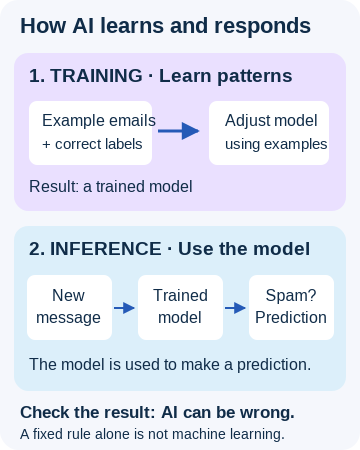

Read the video transcript
Understand the idea
Imagine preparing a handover after a practice shift. Your notes say “rack A: inspection complete; rack B: inspection pending.” You want a clear two-sentence handover. An AI assistant can draft one from the notes you provide.
Worked example
A supported draft is: “Rack A inspection is complete. Rack B inspection is pending; the reason for the delay is not recorded.” Creating the draft is inference. Your fact check is a separate evaluation activity.
Try it yourself
Describe three tasks where AI could help you. For each, identify the input, useful output and one thing you must verify.
This visual recap supports the full lesson. It is not an instructor recording.
AI is a broad field; machine learning learns patterns from data. Generative AI creates outputs such as text or code. Training adjusts a model’s parameters using data. Inference uses a trained model to generate an output. Fluent output can still be incorrect.
Worked example
An assistant summarizing a new fictional server log is performing inference. Updating model weights with many examples is training.Try it yourself
Describe three tasks where AI could help you. For each, identify the input, useful output and one thing you must verify.
Review notes and knowledge checks are available in the student portal.
Write clear prompts
Watch this lesson’s visual explainer
32-second silent teaching clip with on-screen text and English captions. Tap Play; pause to read. Full teaching notes follow the visual guide.
Open this lesson video directly
See the steps: Write clear prompts

Read the video transcript
Understand the idea
Start with the task: what should the assistant actually produce? Add relevant context, such as the learner’s experience or the observed symptom.
Worked example
The improved prompt narrows the problem and makes unsupported assumptions visible. It does not turn an unknown cause into a confirmed diagnosis.
Try it yourself
Write five prompts for useful tasks. Improve one vague prompt and compare the two responses against the same criteria.
This visual recap supports the full lesson. It is not an instructor recording.
State your goal, relevant context, constraints and desired output. Include an example when format matters. Ask for missing details and require assumptions to be labeled. Improve the instructions after reviewing the answer rather than assuming the first response is final.
Worked example
Explain a fictional gateway connectivity failure. The link is up and the IP recently changed. Suggest read-only checks first. Return a table of check, expected observation and next step.Try it yourself
Write five prompts for useful tasks. Improve one vague prompt and compare the two responses against the same criteria.
Review notes and knowledge checks are available in the student portal.
Verify sources and technical claims
Watch this lesson’s visual explainer
32-second silent teaching clip with on-screen text and English captions. Tap Play; pause to read. Full teaching notes follow the visual guide.
Open this lesson video directly
See the steps: Verify sources and technical claims

Read the video transcript
Understand the idea
Suppose an assistant says “This command lists files, includes hidden files and deletes temporary files.” That sentence contains three separate claims. Check them separately. One correct clause does not make the whole sentence reliable.
Worked example
A precise correction is “> excludes equality; >= includes it.” The small test supports this particular comparison rather than every possible numerical claim.
Try it yourself
Choose three claims from an AI-generated troubleshooting guide. Verify each and record the source and any correction.
This visual recap supports the full lesson. It is not an instructor recording.
Check a claim against an original source and confirm the source actually supports it. Verify dates, units and command options. Search results and citations can be incomplete or wrong. Keep a record of the claim, evidence, uncertainty and conclusion.
Worked example
Before accepting an explanation of a Linux command, compare its flags with the manual and test it using disposable sample files.Try it yourself
Choose three claims from an AI-generated troubleshooting guide. Verify each and record the source and any correction.
Review notes and knowledge checks are available in the student portal.