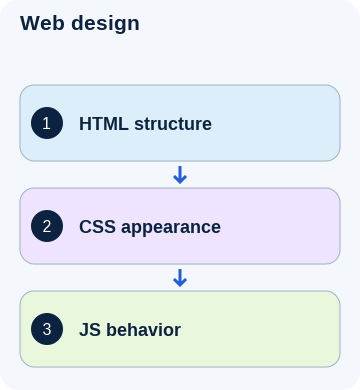
HTML organizes content, CSS styles it, and JavaScript can add interaction.
Connect it to this lesson: Web Design. Identify where the idea fits in the map, then explain it using the lesson’s example. This is a program-level concept map; the written lesson provides the specific detail.
Mini challenge · predict before revealing
Which layer normally controls spacing and colors?
Explain the answer
CSS controls presentation such as spacing, layout and colors.
Practice only. This does not change course progress, certificates or reward eligibility. Explain the answer without looking before moving on.
Course Outline
Explore all 20 lessons, with teaching notes, examples, practical exercises and knowledge checks. The first three lessons are free to preview without an account.
Study time includes extended reading and practice. Free sample previews take about 15–25 minutes each. Create a free account to continue with the full course.
Sample topics and lessons
Design brief and information architecture
Full lesson study allowance: 2 hrs 35 min · Free preview: about 15–25 minutes
Identify the audience, their goal and the main action on the page. Group related content into a clear hierarchy and write concise navigation labels. Sketch the layout before styling; a beautiful page still fails if the visitor cannot find essential information.
Practice activity: Sketch a one-page training site with a clear primary action.
Full lesson study allowance: 2 hrs 35 min · Free preview: about 15–25 minutes
HTML describes meaning and structure. Headings create a hierarchy, links navigate and buttons trigger actions. Use landmarks such as header, nav and main. Meaningful structure helps assistive technology and supports predictable browser behavior.
Practice activity: Write a minimal page outline with one h1 and two h2 sections.
Full lesson study allowance: 2 hrs 35 min · Free preview: about 15–25 minutes
CSS controls presentation. Consistent spacing, readable typography and sufficient contrast help users scan content. The box model includes content, padding, border and margin. When a layout overflows, inspect its total size and inherited styles before adding arbitrary offsets.
Practice activity: Describe the difference between padding and margin and style a readable card.
Watch for: Choose a topic you want to revise. Pause and explain the idea in your own words, then try the quiz without the video.
For a long course, choose the relevant chapter; you do not need to watch the entire video before continuing. This is a supporting program video and may cover only selected topics; it is not a separate recording of every lesson. Videos are optional; use the written lesson and exercises too.
If playback is unavailable, use the source link. Look for captions or a transcript on the provider’s page.
Try a sample practice quiz
Answer all 3 questions, then check your score below. This is a practice check, not the full course or an official certification exam.
Build a portfolio project
Build an accessible responsive training landing page with semantic HTML, CSS, a clear action and a documented mobile review.
Save progress, practice with quizzes and earn an M.E.T. foundation completion certificate. External professional certifications have separate requirements.