Free online learning · Course preview

Servers & storage

Learn the roles of servers, storage systems and basic equipment configuration.

Skills you will build: Explain server and storage choices and basic recovery planning.

Before you start: Hardware fundamentals recommended

Suggested study time: 84 hours · self-paced

Equipment: Local virtual machines or diagrams; enough memory/storage for a small isolated lab. Back up before setup.

Your first project: Design a small file-server plan with users, storage needs, access permissions and a backup-and-restore checklist.

Try a free lessonCreate your free account
See it · Try it · Explain it

Picture the idea

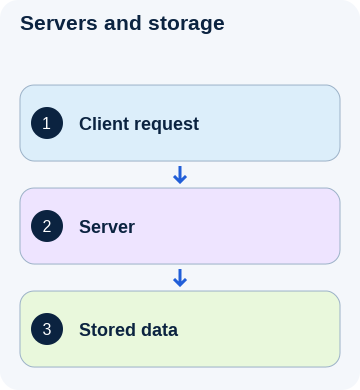
Client request → Server → Stored data
A server handles a request and may retrieve stored data. Backups are separate copies with a recovery purpose.

Connect it to this lesson: Servers & storage. Identify where the idea fits in the map, then explain it using the lesson’s example. This is a program-level concept map; the written lesson provides the specific detail.

Mini challenge · predict before revealing

Does a second disk automatically prove a recoverable backup exists?

Choose one answer

Explain the answer

Redundancy and backups solve different problems. Recovery must be verified.

Practice only. This does not change course progress, certificates or reward eligibility. Explain the answer without looking before moving on.

Course Outline

Explore all 20 lessons, with teaching notes, examples, practical exercises and knowledge checks. The first three lessons are free to preview without an account.

20 lessons · Learn in order at your own pace
LessonStudy timeAccess
Core foundations
1. What servers do2 hrs 15 minTry free →
2. Storage types2 hrs 15 minTry free →
3. Virtualization basics2 hrs 15 minTry free →
4. Backups and resilience2 hrs 15 minStudent account
5. Virtual machines and sizing2 hrs 15 minStudent account
6. RAID, shares and storage capacity2 hrs 15 minStudent account
7. Permissions, patching and monitoring2 hrs 15 minStudent account
8. Backup plans and restore testing2 hrs 15 minStudent account
Applied tools and workflows
9. Server sizing and workload requirements3 hrs 25 minStudent account
10. Storage capacity and units3 hrs 25 minStudent account
11. RAID levels and failure limits3 hrs 25 minStudent account
12. File services and permission inheritance3 hrs 25 minStudent account
Troubleshooting and verification
13. Block, file and object access3 hrs 25 minStudent account
14. Virtual machine lifecycle3 hrs 25 minStudent account
15. Containers and virtual machines3 hrs 25 minStudent account
16. Backup policy and retention3 hrs 25 minStudent account
Project and professional practice
17. Recovery objectives and restoration order3 hrs 25 minStudent account
18. Server monitoring and logs3 hrs 25 minStudent account
19. Patching and controlled configuration3 hrs 25 minStudent account
20. Service deployment and recovery project3 hrs 10 minStudent account

Study time includes extended reading and practice. Free sample previews take about 15–25 minutes each. Create a free account to continue with the full course.

Sample topics and lessons

What servers do

Full lesson study allowance: 2 hrs 15 min · Free preview: about 15–25 minutes

A server provides services to other devices, such as file access or applications. Clients request those services over a network.

Practice activity: Identify the server, client and service in a classroom shared-folder example.

Open sample lesson 1

Storage types

Full lesson study allowance: 2 hrs 15 min · Free preview: about 15–25 minutes

Compare local disks, shared file storage and block storage. Capacity, performance and availability affect the choice.

Practice activity: List three factors to compare before selecting storage.

Open sample lesson 2

Virtualization basics

Full lesson study allowance: 2 hrs 15 min · Free preview: about 15–25 minutes

Virtual machines share a physical host while running separate operating systems. Resources must be allocated within the host’s limits.

Practice activity: Why can several virtual machines slow down when run on one small host?

Open sample lesson 3
Optional video revision

Watch & review before your quiz

Storage devices · storage foundations

Source: Professor Messer · Supplementary video

Watch for: Choose a topic you want to revise. Pause and explain the idea in your own words, then try the quiz without the video.

For a long course, choose the relevant chapter; you do not need to watch the entire video before continuing. This is a supporting program video and may cover only selected topics; it is not a separate recording of every lesson. Videos are optional; use the written lesson and exercises too.

Watch on the source website ↗

If playback is unavailable, use the source link. Look for captions or a transcript on the provider’s page.

Try a sample practice quiz

Answer all 3 questions, then check your score below. This is a practice check, not the full course or an official certification exam.

Question 1 of 3: What does a hypervisor do?

Question 1 of 3

Build a portfolio project

Design a small file-server service: users, least-privilege shares, capacity, backup frequency and a restoration test. Use a VM or a fully documented simulation.

Save progress, practice with quizzes and earn an M.E.T. foundation completion certificate. External professional certifications have separate requirements.
Need help choosing a program?