Learn sensors, motors, microcontrollers and robot control through simulation, practical exercises and a robotics portfolio.
Skills you will build: Explain robot components, program basic sensor-driven control and document a tested simulation.
Before you start: Basic computer skills; no robotics hardware purchase required for the simulation pathway.
Suggested study time: 96 hours · self-paced
Equipment: Computer with Webots; optional supervised low-voltage educational robot kit with its manufacturer’s instructions.
Your first project: Create a simulated obstacle-stopping robot with controller code, a system diagram and at least five tests, including invalid-input stopping and a motor-direction fault.
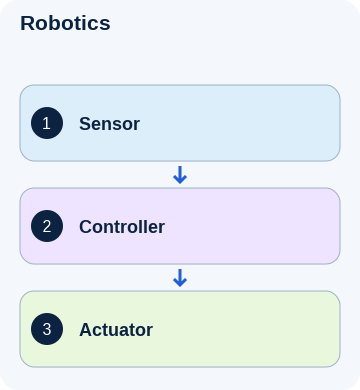
A sensor reports an observation; a controller decides; an actuator performs an action.
Connect it to this lesson: Robotics fundamentals. Identify where the idea fits in the map, then explain it using the lesson’s example. This is a program-level concept map; the written lesson provides the specific detail.
Mini challenge · predict before revealing
Which part measures distance in a simple obstacle-avoidance robot?
Explain the answer
The distance sensor provides an observation for the controller.
Practice only. This does not change course progress, certificates or reward eligibility. Explain the answer without looking before moving on.
Course Outline
Explore all 20 lessons, with teaching notes, examples, practical exercises and knowledge checks. The first three lessons are free to preview without an account.
Study time includes extended reading and practice. Free sample previews take about 15–25 minutes each. Create a free account to continue with the full course.
Sample topics and lessons
How robots sense, decide and act
Full lesson study allowance: 2 hrs 35 min · Free preview: about 15–25 minutes
A robot combines a physical mechanism with sensing, computation and movement. Sensors measure the environment; a controller interprets readings; actuators make changes. Automation follows programmed rules, so a robot does not need AI. Begin with a requirement you can test: stop before an obstacle. Define inputs, outputs, units and a safe operating area before selecting parts. A good design includes a stop action when its inputs are missing or invalid.
Practice activity: Draw the input–controller–output diagram for an obstacle-avoiding robot.
Full lesson study allowance: 2 hrs 35 min · Free preview: about 15–25 minutes
Voltage is electrical potential difference, current is charge flow, and resistance limits current. Ohm’s law relates them: V = I × R. Check component ratings and polarity before connecting a circuit. A microcontroller pin supplies a small signal; it cannot power a drive motor directly. Use an appropriate motor driver and the manufacturer’s specified power supply. Controller and driver often need a common signal ground. Disconnect power before changing wiring. Start in simulation; optional hardware work uses supervised, low-voltage educational kits.
Practice activity: Calculate current for 3 V across 1,000 Ω and explain why a motor needs a driver.
Full lesson study allowance: 2 hrs 35 min · Free preview: about 15–25 minutes
A program stores values, reads inputs and chooses actions. In an Arduino sketch, setup runs once and loop repeats. Use named constants for thresholds, functions for repeated work, and serial output to inspect readings. A long blocking delay can prevent timely sensor checks. Prefer an elapsed-time check for tasks that must continue responding. Simulator controllers may use Python or C; syntax differs, but the sense–decide–act logic is the same. Test one output at a time before adding movement.
Practice activity: Write pseudocode that stops on an invalid reading or an obstacle within 20 cm.
Arduino sensor and servo project demonstration · EDUvision
Source: Arduino · Supplementary video
Watch for: Choose a topic you want to revise. Pause and explain the idea in your own words, then try the quiz without the video.
For a long course, choose the relevant chapter; you do not need to watch the entire video before continuing. This is a supporting program video and may cover only selected topics; it is not a separate recording of every lesson. Videos are optional; use the written lesson and exercises too.
If playback is unavailable, use the source link. Look for captions or a transcript on the provider’s page.
Try a sample practice quiz
Answer all 3 questions, then check your score below. This is a practice check, not the full course or an official certification exam.
Build a portfolio project
Create a simulated obstacle-stopping robot with controller code, a system diagram and at least five tests, including invalid-input stopping and a motor-direction fault.
Save progress, practice with quizzes and earn an M.E.T. foundation completion certificate. External professional certifications have separate requirements.