Free online learning · Course preview

Networking fundamentals

Learn how devices connect, with introductory IP addressing and network troubleshooting.

Skills you will build: Explain a small network and diagnose basic connectivity problems.

Before you start: Computer fundamentals recommended

Suggested study time: 84 hours · self-paced

Equipment: Computer with Cisco Packet Tracer or paper topology; optional isolated switch/router lab.

Your first project: Draw a small school network with a router, switch, access point and three computers. Explain how each device connects.

Try a free lessonCreate your free account
See it · Try it · Explain it

Picture the idea

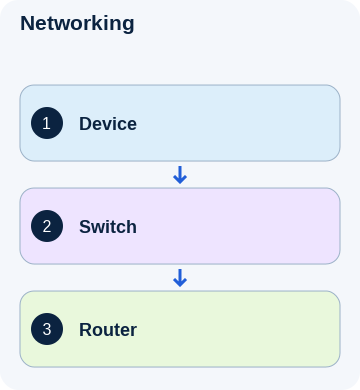
Device → Switch → Router
A switch connects devices within a network; a router connects networks. This simplified path omits some infrastructure.

Connect it to this lesson: Networking fundamentals. Identify where the idea fits in the map, then explain it using the lesson’s example. This is a program-level concept map; the written lesson provides the specific detail.

Mini challenge · predict before revealing

Which device usually forwards traffic between different IP networks?

Choose one answer

Explain the answer

Routing connects different IP networks; switching and routing have different roles.

Practice only. This does not change course progress, certificates or reward eligibility. Explain the answer without looking before moving on.

Course Outline

Explore all 20 lessons, with teaching notes, examples, practical exercises and knowledge checks. The first three lessons are free to preview without an account.

20 lessons · Learn in order at your own pace
LessonStudy timeAccess
Core foundations
1. Network devices2 hrs 15 minTry free →
2. IP addressing2 hrs 15 minTry free →
3. DNS and DHCP2 hrs 15 minTry free →
4. Connectivity checks2 hrs 15 minStudent account
5. Subnetting and default gateways2 hrs 15 minStudent account
6. DHCP, DNS and common services2 hrs 15 minStudent account
7. Segmentation and wireless planning2 hrs 15 minStudent account
8. Layered network troubleshooting2 hrs 15 minStudent account
Applied tools and workflows
9. Network layers and packet journeys3 hrs 25 minStudent account
10. IPv4 subnet calculations3 hrs 25 minStudent account
11. IPv6 addressing and neighbor discovery3 hrs 25 minStudent account
12. Switch forwarding and VLANs3 hrs 25 minStudent account
Troubleshooting and verification
13. Routing tables and default routes3 hrs 25 minStudent account
14. Transport protocols and service ports3 hrs 25 minStudent account
15. Wireless design and signal quality3 hrs 25 minStudent account
16. Network services and time synchronization3 hrs 25 minStudent account
Project and professional practice
17. Network segmentation and access rules3 hrs 25 minStudent account
18. Packet capture and responsible observation3 hrs 25 minStudent account
19. Structured network troubleshooting3 hrs 25 minStudent account
20. Network design project and verification3 hrs 10 minStudent account

Study time includes extended reading and practice. Free sample previews take about 15–25 minutes each. Create a free account to continue with the full course.

Sample topics and lessons

Network devices

Full lesson study allowance: 2 hrs 15 min · Free preview: about 15–25 minutes

Switches connect devices within a network. Routers connect networks. Wireless access points connect Wi-Fi clients.

Practice activity: Which component connects a local network to another network?

Open sample lesson 1

IP addressing

Full lesson study allowance: 2 hrs 15 min · Free preview: about 15–25 minutes

An IP address identifies a network interface. A subnet helps define its local network; a default gateway connects it to other networks.

Practice activity: Identify the device address and gateway in those example settings.

Open sample lesson 2

DNS and DHCP

Full lesson study allowance: 2 hrs 15 min · Free preview: about 15–25 minutes

DNS translates names into addresses. DHCP can assign network settings automatically, reducing manual configuration.

Practice activity: Explain the difference between receiving network settings and resolving a website name.

Open sample lesson 3
Optional video revision

Watch & review before your quiz

Introduction to IP networking

Source: Professor Messer · Supplementary video

Watch for: Choose a topic you want to revise. Pause and explain the idea in your own words, then try the quiz without the video.

For a long course, choose the relevant chapter; you do not need to watch the entire video before continuing. This is a supporting program video and may cover only selected topics; it is not a separate recording of every lesson. Videos are optional; use the written lesson and exercises too.

Watch on the source website ↗

More videos from Professor Messer ↗

If playback is unavailable, use the source link. Look for captions or a transcript on the provider’s page.

Try a sample practice quiz

Answer all 3 questions, then check your score below. This is a practice check, not the full course or an official certification exam.

Question 1 of 3: Which device routes between IP networks?

Question 1 of 3

Build a portfolio project

Build or simulate a small training center with two LANs, a router and four clients. Document addressing, DNS/DHCP roles and tests for a wrong gateway, disconnected cable and name-resolution fault.

Save progress, practice with quizzes and earn an M.E.T. foundation completion certificate. External professional certifications have separate requirements.
Need help choosing a program?