Free online learning · Course preview

Job-readiness training

Prepare resumes, practice interviews and develop communication and workplace skills.

Skills you will build: Present your skills clearly and prepare for entry-level applications.

Before you start: Open to learners across all programs

Suggested study time: 48 hours · self-paced

Equipment: Text editor, fictional application materials and one completed technical project.

Your first project: Prepare a one-page resume, one project summary and a response to a mock troubleshooting interview question.

Try a free lessonCreate your free account
See it · Try it · Explain it

Picture the idea

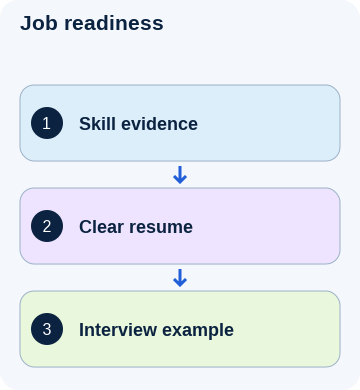
Skill evidence → Clear resume → Interview example
Connect an honest skill claim to a project and explain your own contribution.

Connect it to this lesson: Job-readiness training. Identify where the idea fits in the map, then explain it using the lesson’s example. This is a program-level concept map; the written lesson provides the specific detail.

Mini challenge · predict before revealing

Which is an honest resume claim for a simulated project?

Choose one answer

Explain the answer

Describe the real work and clearly label simulations.

Practice only. This does not change course progress, certificates or reward eligibility. Explain the answer without looking before moving on.

Course Outline

Explore all 20 lessons, with teaching notes, examples, practical exercises and knowledge checks. The first three lessons are free to preview without an account.

20 lessons · Learn in order at your own pace
LessonStudy timeAccess
Core foundations
1. Resume and portfolio1 hr 20 minTry free →
2. Interview practice1 hr 20 minTry free →
3. Workplace communication1 hr 20 minTry free →
4. Finding and evaluating roles1 hr 20 minStudent account
5. Read a job description and identify gaps1 hr 20 minStudent account
6. Explain technical work with STAR1 hr 20 minStudent account
7. Professional communication and applications1 hr 20 minStudent account
8. Evaluate offers and maintain a growth plan1 hr 20 minStudent account
Applied tools and workflows
9. Role research and requirement mapping1 hr 55 minStudent account
10. Resume structure and targeted bullets1 hr 55 minStudent account
11. Portfolio selection and privacy1 hr 55 minStudent account
12. Professional email and application tracking1 hr 55 minStudent account
Troubleshooting and verification
13. Interview preparation and STAR stories1 hr 55 minStudent account
14. Technical interviews and thinking aloud1 hr 55 minStudent account
15. Customer communication and ticket ownership1 hr 55 minStudent account
16. Teamwork, handovers and feedback1 hr 55 minStudent account
Project and professional practice
17. Time management and work planning1 hr 55 minStudent account
18. Offer evaluation and employer verification1 hr 55 minStudent account
19. Professional development and learning gaps1 hr 55 minStudent account
20. Application portfolio and mock interview1 hr 50 minStudent account

Study time includes extended reading and practice. Free sample previews take about 15–25 minutes each. Create a free account to continue with the full course.

Sample topics and lessons

Resume and portfolio

Full lesson study allowance: 1 hr 20 min · Free preview: about 15–25 minutes

Describe skills honestly and support them with examples. Include lab documentation and projects rather than claiming experience you do not have.

Practice activity: Write a resume bullet using one course exercise you completed.

Open sample lesson 1

Interview practice

Full lesson study allowance: 1 hr 20 min · Free preview: about 15–25 minutes

Explain your approach to a problem, ask clarifying questions and describe what you would escalate. Practice concise answers with examples.

Practice activity: Give a 60-second answer to a basic troubleshooting question.

Open sample lesson 2

Workplace communication

Full lesson study allowance: 1 hr 20 min · Free preview: about 15–25 minutes

Write clear tickets and handovers. State the issue, evidence, actions taken and next step; protect confidential information.

Practice activity: Improve a ticket that says only “Internet broken.”

Open sample lesson 3
Optional video revision

Watch & review before your quiz

Preparing for a tech interview

Source: Microsoft Learn · Supplementary video

Watch for: Choose a topic you want to revise. Pause and explain the idea in your own words, then try the quiz without the video.

For a long course, choose the relevant chapter; you do not need to watch the entire video before continuing. This is a supporting program video and may cover only selected topics; it is not a separate recording of every lesson. Videos are optional; use the written lesson and exercises too.

Watch on the source website ↗

More videos from Microsoft Learn ↗

If playback is unavailable, use the source link. Look for captions or a transcript on the provider’s page.

Try a sample practice quiz

Answer all 3 questions, then check your score below. This is a practice check, not the full course or an official certification exam.

Question 1 of 3: How should a simulated lab be described?

Question 1 of 3

Build a portfolio project

Submit a one-page resume, redacted project portfolio, a role-specific cover message and a recorded or peer-observed mock technical interview.

Save progress, practice with quizzes and earn an M.E.T. foundation completion certificate. External professional certifications have separate requirements.
Need help choosing a program?