Free online learning · Course preview

Hands-on data center lab training

Apply skills through planned equipment exercises and troubleshooting scenarios.

Skills you will build: Apply technical skills in a supervised setting and document your work.

Before you start: Hardware, networking and safety foundations recommended

Suggested study time: 84 hours · self-paced

Equipment: Packet Tracer and Linux VM for the simulation route; instructor and authorized isolated equipment for physical rack work.

Your first project: Complete a simulated rack-and-network fault exercise and submit the diagram, incident ticket and handover notes.

Try a free lessonCreate your free account
See it · Try it · Explain it

Picture the idea

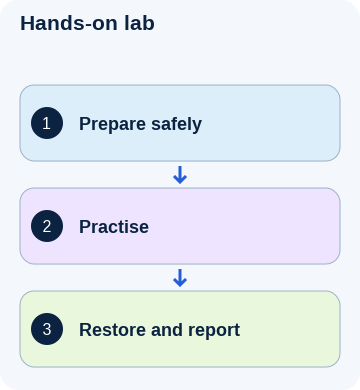
Prepare safely → Practise → Restore and report
Use approved training equipment or a simulation; document the activity and leave a safe lab.

Connect it to this lesson: Hands-on data center lab training. Identify where the idea fits in the map, then explain it using the lesson’s example. This is a program-level concept map; the written lesson provides the specific detail.

Mini challenge · predict before revealing

No physical rack is available. What is a useful learning alternative?

Choose one answer

Explain the answer

Simulation can build reasoning and documentation skills without pretending it verifies physical competence.

Practice only. This does not change course progress, certificates or reward eligibility. Explain the answer without looking before moving on.

Course Outline

Explore all 20 lessons, with teaching notes, examples, practical exercises and knowledge checks. The first three lessons are free to preview without an account.

20 lessons · Learn in order at your own pace
LessonStudy timeAccess
Core foundations
1. Lab orientation2 hrs 15 minTry free →
2. Rack and cable documentation2 hrs 15 minTry free →
3. Guided troubleshooting2 hrs 15 minTry free →
4. Handover and restoration2 hrs 15 minStudent account
5. Lab baseline and safety briefing2 hrs 15 minStudent account
6. Integrated network and server exercise2 hrs 15 minStudent account
7. Fault injection and rollback2 hrs 15 minStudent account
8. Lab assessment and portfolio handover2 hrs 15 minStudent account
Applied tools and workflows
9. Lab authorization and isolated environments3 hrs 25 minStudent account
10. Baseline inventory and topology3 hrs 25 minStudent account
11. Rack layout and mounting rehearsal3 hrs 25 minStudent account
12. Cable tracing and endpoint confirmation3 hrs 25 minStudent account
Troubleshooting and verification
13. Virtual server deployment exercise3 hrs 25 minStudent account
14. Addressing and connectivity fault lab3 hrs 25 minStudent account
15. Service failure and log analysis3 hrs 25 minStudent account
16. Backup and restoration exercise3 hrs 25 minStudent account
Project and professional practice
17. Monitoring and incident ticket lab3 hrs 25 minStudent account
18. Approved change and rollback simulation3 hrs 25 minStudent account
19. Integrated fault isolation challenge3 hrs 25 minStudent account
20. Lab portfolio and observed skills review3 hrs 10 minStudent account

Study time includes extended reading and practice. Free sample previews take about 15–25 minutes each. Create a free account to continue with the full course.

Sample topics and lessons

Lab orientation

Full lesson study allowance: 2 hrs 15 min · Free preview: about 15–25 minutes

Review equipment, permitted activities and emergency procedures with an instructor before starting. Use isolated or simulated systems.

Practice activity: What should you check before changing equipment in a lab?

Open sample lesson 1

Rack and cable documentation

Full lesson study allowance: 2 hrs 15 min · Free preview: about 15–25 minutes

Practice rack diagrams, device labeling and connection records. Confirm the planned connection before moving any cable.

Practice activity: Prepare a mock rack record with one server and one switch.

Open sample lesson 2

Guided troubleshooting

Full lesson study allowance: 2 hrs 15 min · Free preview: about 15–25 minutes

Use instructor-prepared faults to practice observation, diagnosis and verification. Make only authorized changes.

Practice activity: Write a five-step troubleshooting approach for this controlled fault.

Open sample lesson 3
Optional video revision

Watch & review before your quiz

Data center cabling · FOA Lecture 38

Source: Fiber Optic Association · Supplementary video

Watch for: Choose a topic you want to revise. Pause and explain the idea in your own words, then try the quiz without the video.

For a long course, choose the relevant chapter; you do not need to watch the entire video before continuing. This is a supporting program video and may cover only selected topics; it is not a separate recording of every lesson. Videos are optional; use the written lesson and exercises too.

Watch on the source website ↗

More videos from Fiber Optic Association ↗

If playback is unavailable, use the source link. Look for captions or a transcript on the provider’s page.

Try a sample practice quiz

Answer all 3 questions, then check your score below. This is a practice check, not the full course or an official certification exam.

Question 1 of 3: Why record a working baseline before faults?

Question 1 of 3

Build a portfolio project

Deliver an integrated simulated rack: network topology, IP plan, Linux service checks, backup/restore evidence, fault ticket and shift handover. Physical mounting/fiber work is an instructor-assessed extension.

Save progress, practice with quizzes and earn an M.E.T. foundation completion certificate. External professional certifications have separate requirements.
Need help choosing a program?