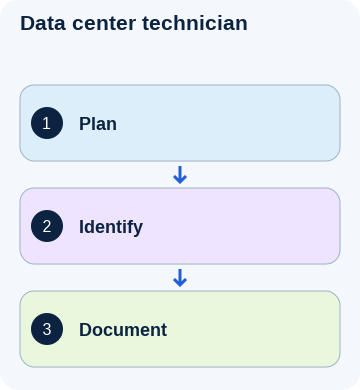
Confirm the approved task, identify the correct equipment, and record the result before handing over.
Connect it to this lesson: Data Center Technician training. Identify where the idea fits in the map, then explain it using the lesson’s example. This is a program-level concept map; the written lesson provides the specific detail.
Mini challenge · predict before revealing
Before working on a rack, what should you confirm?
Explain the answer
Correct identification and authorization come before a physical change.
Practice only. This does not change course progress, certificates or reward eligibility. Explain the answer without looking before moving on.
Course Outline
Explore all 20 lessons, with teaching notes, examples, practical exercises and knowledge checks. The first three lessons are free to preview without an account.
16. Standard, maintenance and emergency procedures
2 hrs 55 min
Student account
Project and professional practice
17. Change windows and rollback decisions
2 hrs 55 min
Student account
18. Remote hands and device verification
2 hrs 55 min
Student account
19. Incidents, handovers and root-cause review
2 hrs 55 min
Student account
20. Operations portfolio and readiness review
3 hrs
Student account
Study time includes extended reading and practice. Free sample previews take about 15–25 minutes each. Create a free account to continue with the full course.
Sample topics and lessons
Inside a data center
Full lesson study allowance: 1 hr 55 min · Free preview: about 15–25 minutes
Data centers house computing and networking equipment. Power, cooling, connectivity and physical security support reliable operation.
Practice activity: Name four supporting systems a data center needs.
AI-ready data center infrastructure · industry overview
Source: Schneider Electric · Supplementary video
Watch for: Choose a topic you want to revise. Pause and explain the idea in your own words, then try the quiz without the video.
For a long course, choose the relevant chapter; you do not need to watch the entire video before continuing. This is a supporting program video and may cover only selected topics; it is not a separate recording of every lesson. Videos are optional; use the written lesson and exercises too.
If playback is unavailable, use the source link. Look for captions or a transcript on the provider’s page.
Try a sample practice quiz
Answer all 3 questions, then check your score below. This is a practice check, not the full course or an official certification exam.
Build a portfolio project
Create a rack elevation, asset list, daily inspection checklist and incident handover for a simulated server-rack temperature alarm.
Save progress, practice with quizzes and earn an M.E.T. foundation completion certificate. External professional certifications have separate requirements.