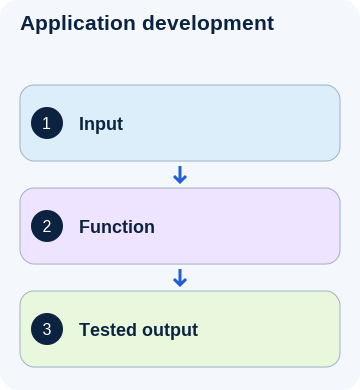
Define the input, implement one behavior, and test expected and unexpected cases.
Connect it to this lesson: Application Development. Identify where the idea fits in the map, then explain it using the lesson’s example. This is a program-level concept map; the written lesson provides the specific detail.
Mini challenge · predict before revealing
What should you record before running a test?
Explain the answer
An expected result gives you a basis for evaluating actual behavior.
Practice only. This does not change course progress, certificates or reward eligibility. Explain the answer without looking before moving on.
Course Outline
Explore all 20 lessons, with teaching notes, examples, practical exercises and knowledge checks. The first three lessons are free to preview without an account.
20. Deployment, monitoring and application capstone
3 hrs 30 min
Student account
Study time includes extended reading and practice. Free sample previews take about 15–25 minutes each. Create a free account to continue with the full course.
Sample topics and lessons
Requirements and application planning
Full lesson study allowance: 2 hrs 35 min · Free preview: about 15–25 minutes
Start with the user’s task and define observable acceptance criteria. Break features into a small first version. Separate input, processing, output and persistence. A clear requirement lets you test whether the application works rather than judging only its appearance.
Practice activity: Write three acceptance criteria for a study-budget app.
Full lesson study allowance: 2 hrs 35 min · Free preview: about 15–25 minutes
Variables refer to values. Numbers, strings and booleans represent different kinds of data; input from a text field is commonly a string. Convert deliberately and reject invalid or unreasonable values. Validation in a browser improves usability but a production server must also validate untrusted requests.
Practice activity: Predict the result of numeric multiplication and explain why string concatenation is different.
Full lesson study allowance: 2 hrs 35 min · Free preview: about 15–25 minutes
Conditions choose behavior and loops repeat operations. Define the stopping condition before writing a loop. Test boundary cases, such as zero items, one item and a maximum allowed count. A loop with no reachable stop can freeze the interface or consume resources.
Practice activity: Write pseudocode to count incomplete tasks in a list.
Watch for: Choose a topic you want to revise. Pause and explain the idea in your own words, then try the quiz without the video.
For a long course, choose the relevant chapter; you do not need to watch the entire video before continuing. This is a supporting program video and may cover only selected topics; it is not a separate recording of every lesson. Videos are optional; use the written lesson and exercises too.
If playback is unavailable, use the source link. Look for captions or a transcript on the provider’s page.
Try a sample practice quiz
Answer all 3 questions, then check your score below. This is a practice check, not the full course or an official certification exam.
Build a portfolio project
Build a study-budget application with validated inputs, a calculation function, clear output, test cases and a README.
Save progress, practice with quizzes and earn an M.E.T. foundation completion certificate. External professional certifications have separate requirements.